Over the past few years, we have become accustomed to thinking of artificial intelligence as something that lives far away. We type a question into ChatGPT, Gemini, Claude or Perplexity, and the answer arrives from enormous data centres thousands of kilometres away. Yet several recent developments point to a trend that does not replace cloud AI, but is beginning to complement it: artificial intelligence is gradually returning to the personal computer.
The first is NVIDIA's renewed push for computers equipped for local AI. Two levels should be distinguished here: RTX AI PCs, designed to bring AI to home users or more advanced professionals; and machines such as DGX Spark, which belong more to the prosumer or development end of the market and are certainly not necessary to get started. The second is the launch of Gemma 4, Google's new family of open models, with small versions for modest devices and more capable models for laptops and workstations. The third is the improvement of tools such as Google AI Edge and LiteRT-LM, designed to run models on devices, in applications and in browsers.
Local models are not new. Indeed, estrategIA has discussed this trend several times, from AI built into mobile phones, as we explored in estrategIA #12, to recent models capable of running on personal computers and even powerful phones, as covered in estrategIA #127. What is new is not the existence of local AI. It is that it is becoming simple enough and useful enough for anyone with a reasonably decent computer to try it without feeling as though they have wandered into a film about hackers.
Local models: not at the frontier, but already good enough
We should avoid exaggerating. A local model does not yet replace the major commercial frontier models. The most advanced systems from OpenAI, Anthropic, Google or xAI will still be better at many complex tasks: deep reasoning, lengthy analysis, research using current sources, highly polished writing, or work requiring a high degree of reliability.
But that comparison can obscure what matters. As a rough estimate, local models may be a year or a year and a half behind frontier models. Yet AI a year or a year and a half ago was already extraordinarily useful. Before the current, more agentic phase, AI was already helping people write, summarise, code, translate, organise documents, prepare lessons, analyse texts and improve everyday processes.
The question, then, is not whether a local model is “the best in the world”. It is whether it is useful for a significant part of our work. And the answer is beginning to be a clear yes. For summarising texts, organising notes, producing first drafts, translating documents, generating outlines, classifying ideas, rephrasing paragraphs, helping with simple code or analysing information we do not want to upload to the cloud, many local models are already more than adequate.
If the trend continues, moreover, the implication is intriguing: perhaps in 2027 we will be able to run local models on our computers or phones at a level comparable to today's best commercial systems. They will not be exactly the same, because the frontier will keep advancing, but a kind of “follow-on effect” seems to be taking hold: what today appears reserved for the major laboratories could tomorrow become a capability available at home or within an institution.
The great advantage is clear: privacy and control. If a model runs on our computer, our texts, documents and notes need not leave the device. This does not make everything automatically secure or mean we can ignore the settings, but it does offer a valuable degree of control. It also lets us experiment more freely, compare models, work offline, avoid variable usage costs and better understand how these tools work.
It is like the difference between always consulting a large external library and having a small library of your own at home. The first will be more comprehensive; the second, more limited. But some things you prefer to keep close.
Getting started: a small AI laboratory on your own computer
The easiest way to begin is probably LM Studio. It is not the only option—there are also Ollama, Open WebUI and more advanced tools such as llama.cpp—but LM Studio has one important virtue for non-technical users: it installs like an ordinary application.
The movement has just taken another step: LM Studio has launched Locally, its mobile app for iPhone and iPad, alongside LM Link, which lets you use models loaded on your own computers from a mobile device through a secure, end-to-end encrypted connection. In other words, this is about more than running models on a computer. It is about beginning to carry our own local models “in our pockets”, without always depending on the cloud.
On a computer, the basic process is this. First, go to lmstudio.ai and download the Windows, Mac or Linux version. Then open the application, find a compatible model, download it and start a conversation.
To avoid getting lost among technical names, my own experience suggests thinking in terms of three levels.
If your machine is modest—for example, a laptop with 8 or 16 GB of RAM—the sensible approach is to start with small models. Within Gemma 4, quantised E2B or E4B versions may be a first point of entry. Small Mistral 3 models, especially the 3B or 8B versions, are also worth considering.
On a mid-range machine with 16 or 32 GB of RAM, Gemma 4 12B could be a very interesting experiment. Google presents it precisely as a model designed to bring multimodal capabilities and advanced reasoning to laptops without always depending on the cloud.
If you have a more powerful computer, more RAM or a good graphics card, you can explore something more ambitious, such as the excellent Qwen3.6-35B-A3B or similar mixture-of-experts (MoE) models, which activate only part of the model at each step and can offer an attractive balance between size and performance. For the more curious, the new open models from Mistral, Qwen, DeepSeek or Google are also worth following.
You do not have to start with the largest model. In fact, smaller, faster models are usually better for learning. Simply load a model and give it straightforward tasks: “summarise this text in ten ideas”, “turn these notes into an outline”, “give me five headlines”, “rewrite this paragraph more clearly”, or “extract the arguments for and against”.
Your first impression will probably be twofold. On the one hand, you will notice that a local model lacks the brilliance of the best commercial models. On the other, you will discover that, for many tasks, it is enough. And that word—enough—matters greatly. Many technological revolutions begin when a tool becomes sufficiently useful, rather than perfect.
A very clear example in our field: a consultant can summarise internal notes without uploading them to an external platform; a teacher can organise their own materials; a journalist can prepare an outline; and a public-sector professional can produce an initial summary of non-critical documents before human review. The aim is not to automate decisions, but to create a small space for support, learning and experimentation.
Something similar is happening with images through ComfyUI, which lets you run visual-generation workflows locally with open models. Its learning curve is considerably steeper than LM Studio's, but it offers enormous control for those who want to experiment with images, styles, editing and visual automation. I would not recommend it as everyone's first point of entry, but it is an excellent laboratory for people with curiosity and patience.
Open models and technological autonomy
The future will probably be hybrid. We will use frontier models for the most demanding work, internet-connected models to research current affairs, commercial visual models for quick results, and local models for private, routine or experimental tasks. The aim is not to abandon the cloud, but to avoid depending on it all the time.
And this is where the political dimension emerges. If our entire relationship with AI passes through a small group of closed platforms, capability becomes concentrated. If some of that AI can run on our computers, within our organisations or on our own infrastructure, we regain a small degree of autonomy.
That is why the open-model movement matters so much. Not all “open” models are alike, and we should distinguish between open source, open weights, permissive licences and downloads that remain subject to controls. Even with those qualifications, however, families such as Gemma, Qwen, Mistral, DeepSeek and, in its day, Llama have created infrastructure that complements the frontier models of the major laboratories. This does not remove their power, but it prevents all innovation from depending solely on them.
For citizens, journalists, teachers, consultants, political parties, associations and public administrations, this open, local layer could be decisive. It allows people to experiment, train teams, build prototypes, work with internal documents and understand the technology better. It does not replace ChatGPT or Gemini, but it helps us experience AI as more than a subscription to a closed platform.
Today we are talking about trying a model on a laptop. Tomorrow we will be talking about personal agents, assistants with memory and systems connected to our own folders, document collections or communication channels. Projects such as Hermes Agent already point in that direction, although they remain more advanced and are not intended for the average user.
The invitation, then, is not to replace ChatGPT. It is to try. Install LM Studio. Download a small model. Carry out a real, simple, non-critical task. Compare. See where it fails, where it succeeds and where it can already be useful.
For now, the most powerful AI will continue to live in large data centres. But a growing part of artificial intelligence is beginning to fit on our desktops too. And in an age of enormous technological concentration, every small space for control is worth exploring.
Director of Digital Innovation at ALEPH Educational Institution and editor of the estrategIA newsletter.
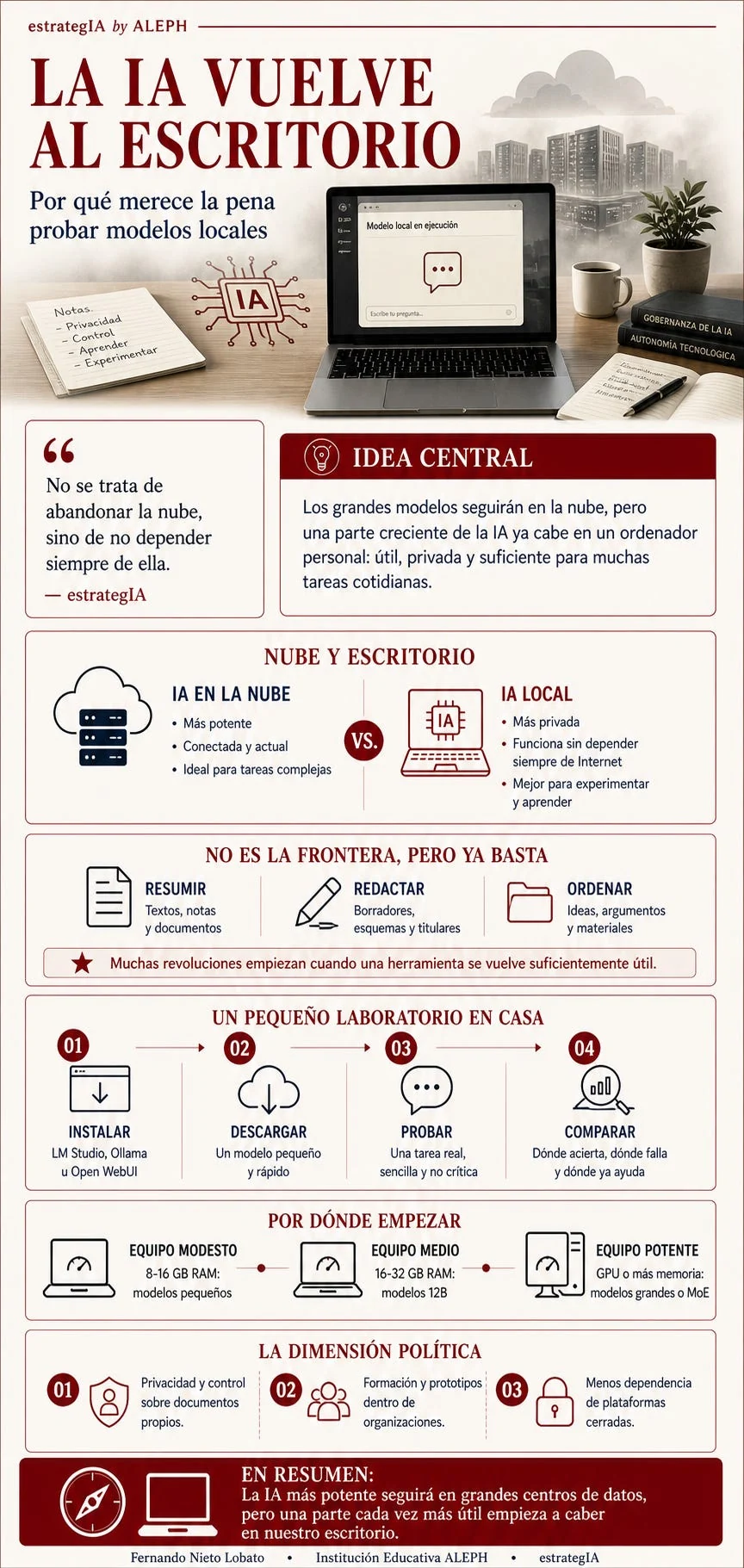
English reading of the original infographic, “AI returns to the desktop: why local models are worth trying”:
- Central idea: the largest models will remain in the cloud, but a growing share of AI already fits on a personal computer: useful, private and sufficient for many everyday tasks. The highlighted quotation reads: “The aim is not to abandon the cloud, but to avoid depending on it all the time.”
- Cloud and desktop: cloud AI is more powerful, connected and up to date, and ideal for complex tasks. Local AI is more private, works without always depending on the internet, and is better for experimentation and learning.
- Not at the frontier, but already enough: summarise texts, notes and documents; write drafts, outlines and headlines; organise ideas, arguments and materials. “Many revolutions begin when a tool becomes sufficiently useful.”
- A small laboratory at home: 1. Install LM Studio, Ollama or Open WebUI. 2. Download a small, fast model. 3. Try a real, simple, non-critical task. 4. Compare where it succeeds, where it fails and where it already helps.
- Where to begin: modest machine, 8–16 GB RAM—small models; mid-range machine, 16–32 GB RAM—12B models; powerful machine, GPU or more memory—large models or MoE.
- The political dimension: privacy and control over your own documents; training and prototypes within organisations; less dependence on closed platforms.
- Closing message: the most powerful AI will remain in large data centres, but a growing and increasingly useful part is beginning to fit on our desktops.
The illustrated notebook lists privacy, control, learning and experimentation. The screen reads “Local model running” and “Write your question”; the books are labelled “AI governance” and “Technological autonomy”. The graphic is credited to Fernando Nieto Lobato, ALEPH Educational Institution and estrategIA. Model and hardware suggestions are those of the June 2026 original; the illustration does not provide measured benchmark results.
Cite this essay
Fernando Nieto Lobato. “AI returns to the desktop: why local models are worth trying.” estrategIA, issue 141, 10 June 2026. English edition, 29 September 2026. https://elcontemplador.github.io/estrategia-english/essays/141/